Bishop guides clients with their various estate planning needs and helps them navigate the Medicaid system in Florida. Bishop also represents clients worldwide in front of the IRS. Bishop is also a V.A. accredited attorney and helps Veterans obtain benefits from the Department of Veterans Affairs.
Frederick W Daily III was an experienced tax attorney with over 50 years in the field.
Share
The final kind of IRS audit—the field audit—is the most deadly. The name refers to the fact that it takes place outside the IRS offices. An IRS revenue agent comes to your business or home, or if you don’t want to deal with the audit yourself, to your tax pro’s office.
Introduction
About 22% of all individual audits are performed face-to-face in an office or field audit, a total of over 350,000 audits every year. The average audit bill, with tax and penalties, comes to over $20,000, though I’ve seen audit bills that went well into the six figures. Of all field audits, over 80% result in a tax bill of some amount. So, my advice is to take a field audit notice very seriously.
CAUTION:
Revenue agents are the IRS elite auditors. Revenue agents have a college degree in accounting or 30 semester hours of college-level accounting. They are given intensive IRS audit training. They are like detectives, looking for clues.
Does your tax reporting match up with your home, lifestyle, business, and investments?
If the agent learns that you live in a Malibu mansion, drive a Range Rover, and report $20,000 income from your dental practice, he or she will don Sherlock gear and start digging.
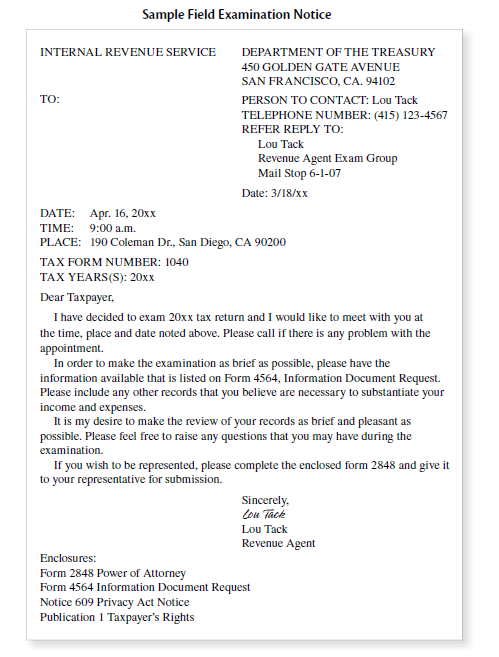
The field audit notice will include a list of items the IRS wants you to produce at the audit meeting, such as bank statements, canceled checks, and rental contracts. Do not assume that this list represents everything the IRS
is curious about. In a field audit, everything is fair game. The revenue agent can probe into any area of your tax return and your financial life.
Call to Schedule the Audit
Before you call the revenue agent to set up the audit meeting, give thought to where you want the audit held. The revenue agent will go wherever you keep your financial records. If it’s at your office, then the agent will come to your business site. If you keep the records at your home or you work at home, the agent will do the audit there.
Also, think about when to schedule the audit. Give yourself plenty of time to prepare by asking for at least a month—preferably two. The IRS doesn’t start before 7:30 a.m. or go past 5:00 p.m., and never on weekends.
Finally, consider whether you feel comfortable handling the audit yourself or whether you want to hire a tax pro. If you want to send your tax pro, have that person call to schedule the appointment.
Keeping the Auditor Away From Your Home or Business
Our advice is to avoid having an audit at your home or office, even if you think you have nothing to hide.
Maybe you earn only $30,000, but live much better because you inherited your house, rebuilt your BMW from junkyard parts, and live extremely frugally. You might think you won’t have any problems with the IRS once the agency knows the truth, but don’t count on it.
CAUTION:
Claims of inherited property, rebuilding expensive cars, and living a frugal life that would put even Scrooge to shame are just the kinds of things that may cause the auditor to dig even deeper.
TIP:
Under the Taxpayers’ Bill of Rights, small business owners have the right to refuse to have a field audit at the business’s premises if it would virtually shut them down.
Even if the audit would cause only minor disruption,
request that it be at the IRS office or at your tax pro’s office. If your request is denied, complain to the revenue agent’s manager and then if necessary, to the Taxpayer Advocate Service.
Prepare for the Audit
Many of the issues in a field audit are the same as those in an office audit. So before continuing on with the rest of the chapter, click here and here and read the material on preparing for an office audit.
Basic Preparation Steps
Once you review the office audit material here and here, follow these basic steps:
Step 1. Review the tax return being audited
If you had your return professionally prepared, go over it with the preparer. If you prepared the return yourself and have any uncertainties, review it and your audit notice with an audit-experienced tax pro. Keep in mind that you weren’t picked at random. There’s a good chance that something on the face of the tax return caused you to be selected for a field audit. An experienced tax pro should be able to review your tax return and have some ideas about why you were selected. Then you can focus on those likely areas.
Whether or not you hire a tax pro to represent you at the audit is your call. It may depend on your pocketbook and IRS anxiety level. Remember, you must provide documentation to support items on your tax return. Make the decision to hire a tax pro or handle the audit yourself before the audit begins, although you are allowed to bring in a tax pro at any time.
Step 2. Organize all the records used to prepare the return
Put your records into logical and clear order according to the income, deduction, exemption, or claim category. Run adding machine tape totals of receipts and proof of payments for each classification, such as “rent,” “travel,” and “utilities.” Staple
the tapes to the receipt to show your work. If the tapes don’t match numbers on your tax return, be ready to explain why.
Well-organized records are the key to winning most audits.
Step 3. Research the tax law, if necessary
Few audits involve legal issues—they tend to focus on the substantiation of deductions—so it’s unlikely that you will have to look up any tax law. But if you are unsure as to whether or not you were entitled to a tax benefit claimed on your tax return—for instance, whether or not you met all the requirements for a home office deduction—put on your research cap. You can hire a tax pro to research the question for you or hit the library or the Internet.
We use cookies and similar technologies to improve site performance, security, and analytics. You can accept or manage your preferences. See our Privacy Policy and Terms of Use for Details.
Cookie Preferences
Manage your cookie preferences below:
Essential cookies enable basic functions and are necessary for the proper function of the website.
Name
Description
Duration
Geolocation Config
This cookie is used to store the consent settings based on the visitor's location.
30 days
Cookie Preferences
This cookie is used to store the user's cookie consent preferences.
30 days
Cookie Preferences
This cookie is used to store the user's cookie consent preferences.
30 days
Google Tag Manager simplifies the management of marketing tags on your website without code changes.
Name
Description
Duration
cookiePreferences
Registers cookie preferences of a user
2 years
td
Registers statistical data on users' behaviour on the website. Used for internal analytics by the website operator.
session
Statistics cookies collect information anonymously. This information helps us understand how visitors use our website.
Google Analytics is a powerful tool that tracks and analyzes website traffic for informed marketing decisions.
Contains information related to marketing campaigns of the user. These are shared with Google AdWords / Google Ads when the Google Ads and Google Analytics accounts are linked together.
90 days
__utma
ID used to identify users and sessions
2 years after last activity
__utmt
Used to monitor number of Google Analytics server requests
10 minutes
__utmb
Used to distinguish new sessions and visits. This cookie is set when the GA.js javascript library is loaded and there is no existing __utmb cookie. The cookie is updated every time data is sent to the Google Analytics server.
30 minutes after last activity
__utmc
Used only with old Urchin versions of Google Analytics and not with GA.js. Was used to distinguish between new sessions and visits at the end of a session.
End of session (browser)
__utmz
Contains information about the traffic source or campaign that directed user to the website. The cookie is set when the GA.js javascript is loaded and updated when data is sent to the Google Anaytics server
6 months after last activity
__utmv
Contains custom information set by the web developer via the _setCustomVar method in Google Analytics. This cookie is updated every time new data is sent to the Google Analytics server.
2 years after last activity
__utmx
Used to determine whether a user is included in an A / B or Multivariate test.
18 months
_ga
ID used to identify users
2 years
_gali
Used by Google Analytics to determine which links on a page are being clicked
30 seconds
_ga_
ID used to identify users
2 years
_gid
ID used to identify users for 24 hours after last activity
24 hours
_gat
Used to monitor number of Google Analytics server requests when using Google Tag Manager